Spine width calculator
This spine width calculator multiplies your page count by the KDP paper factor. White paper adds 0.002252 in per page, and cream adds 0.0025 in. So a 300 page book is 0.676 in on white and 0.75 in on cream. It also tells you if spine text fits.
By The Spinewrap team (Product and testing). Last updated .
| Measure | Inches | mm | 300 DPI |
|---|---|---|---|
| Full cover width (with bleed) | 12.7 in | 322.6 mm | 3810 px |
| Full cover height (with bleed) | 9.25 in | 235 mm | 2775 px |
| Spine width | 0.4504 in | 11.4 mm | 135 px |
| Front and back cover width | 6 in | 152.4 mm | 1800 px |
| Trim height | 9 in | 228.6 mm | 2700 px |
| Bleed on each outside edge | 0.125 in | 3.2 mm | 38 px |
- Spine text is allowed at this page count.
How to use the spine width calculator, step by step
- Enter the page count of your interior, blank pages included.
- Pick the ink and paper type.
- Read the spine width in inches, mm and pixels.
- Check the note on spine text, since short books cannot have it.
- Then download a template with the spine already marked.
The calculator and the templates are free. Print-ready covers and interiors come with 3 free proof runs a day; see the pricing page for clean files, or read how we check the KDP math.
The spine width formula
KDP lists one thickness per paper type. The spine is simply the page count times that number. Trim size does not change it, so a 6 x 9 and a 5 x 8 book with the same pages share one spine.
For example, 200 pages on white paper give 200 times 0.002252, which is 0.4504 in. On groundwood paper, the same book gets 0.47 in. The spine width calculator keeps four decimals, because KDP checks the cover file closely.
Spine text and the 79 page rule
KDP prints spine text only on books with 79 pages or more. Below that, the spine is too thin, and text may wrap onto the cover. So the calculator warns you and draws the spine without a text zone.
Also, spine text needs 0.0625 in of room on each side. Therefore, a 100 page book on white paper has only about 0.1 in for the title. In that case, use short text in a small, bold font.
Use the spine width calculator twice
Run the spine width calculator once when you plan the book and again when the interior is final. Edits often add or remove a few pages. Even eight pages shift the spine by almost 0.02 in on white paper.
Next, rebuild the cover with the new number. As a result, the folds land on the spine edges and the title stays centered. Finally, keep the old file, so you can compare the two before you upload.
KDP spine width by paper type
| Pages | White | Cream | Groundwood | Premium color |
|---|---|---|---|---|
| 79 | 0.1779 in | 0.1975 in | 0.1857 in | 0.1854 in |
| 100 | 0.2252 in | 0.25 in | 0.235 in | 0.2347 in |
| 200 | 0.4504 in | 0.5 in | 0.47 in | 0.4694 in |
| 300 | 0.6756 in | 0.75 in | 0.705 in | 0.7041 in |
| 500 | 1.126 in | 1.25 in | 1.175 in | 1.1735 in |
Spine width calculator tested with a real book
We built this file with the same code the tool on this page uses, from the public domain text of The Wonderful Wizard of Oz. So the image and the numbers below come from that run, not from a mockup.
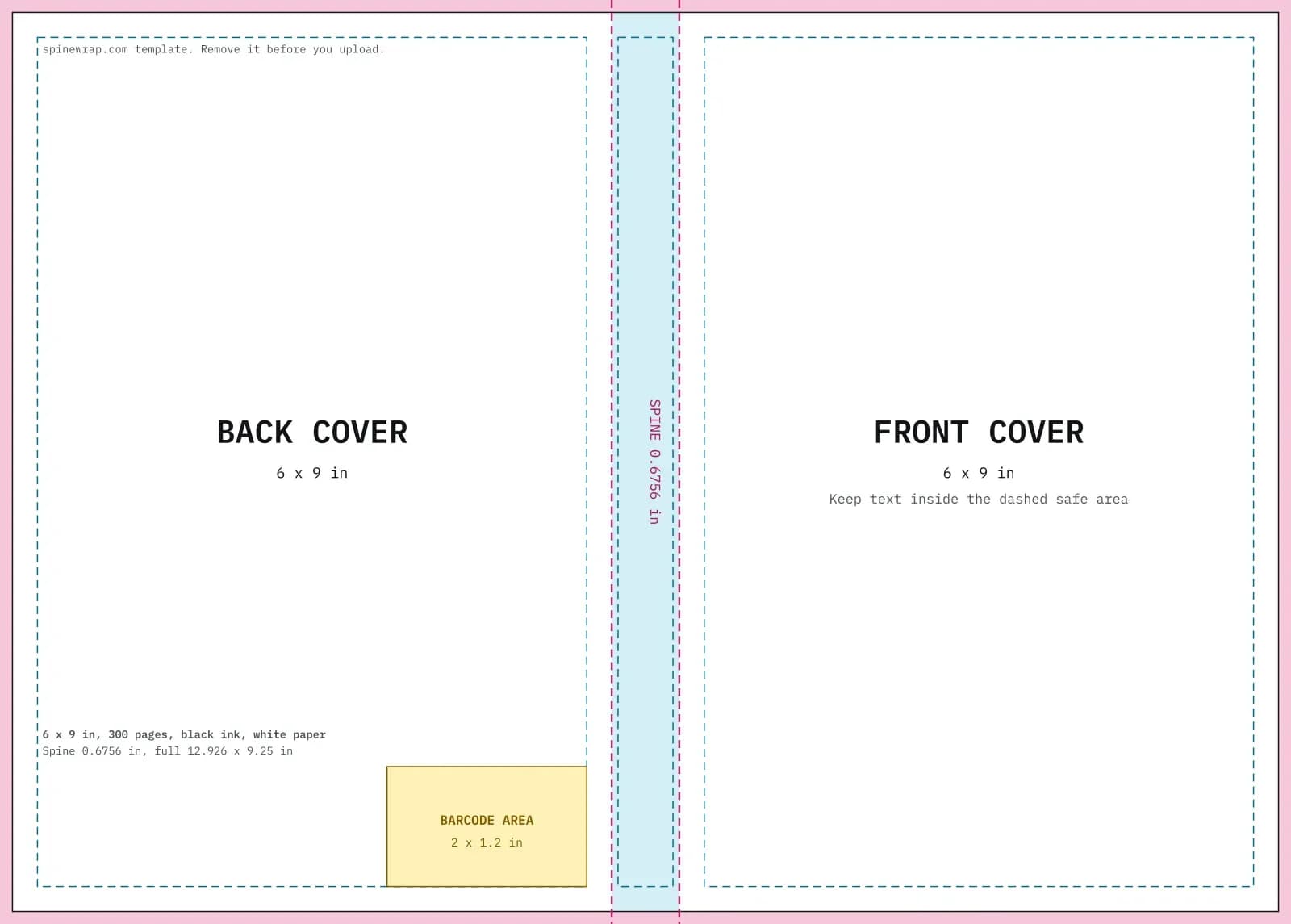
- Test input
- 6 x 9 in, 300 pages, black ink on white paper
- Output
- Cover template PDF and 300 DPI PNG
- Full cover
- 12.926 x 9.25 in
- Pixels
- 3878 x 2775 px
- Spine
- 0.6756 in
- Spine text
- Allowed
- PDF size
- 13 KB
- Build time
- 175 ms
How we check files: a script compares every size with the KDP formula, and we open each PDF to check fonts, margins and the spine. More on the about page.
Spine width calculator FAQ
Does trim size change the spine width?
No. Only page count and paper type change it. Trim size changes the width of the front and back panels.
What is the thinnest spine KDP allows?
KDP needs at least 24 pages, which makes a spine of about 0.054 in on white paper. That spine is too thin for text.
Why is my KDP spine a little different?
Check the page count. KDP counts the pages in the uploaded PDF, so blank pages at the end count too.
Is standard color the same as white paper?
Yes. Standard color uses the same 0.002252 in factor as black ink on white paper, but it needs at least 72 pages.