KDP cover template generator
Make a KDP cover template in three steps: pick the trim size, type the page count and choose the paper. The generator draws bleed, trim, spine, safe areas and the barcode box at the exact KDP size. Then download it as a vector PDF and a 300 DPI PNG, free.
By The Spinewrap team (Product and testing). Last updated .
| Measure | Inches | mm | 300 DPI |
|---|---|---|---|
| Full cover width (with bleed) | 12.7 in | 322.6 mm | 3810 px |
| Full cover height (with bleed) | 9.25 in | 235 mm | 2775 px |
| Spine width | 0.4504 in | 11.4 mm | 135 px |
| Front and back cover width | 6 in | 152.4 mm | 1800 px |
| Trim height | 9 in | 228.6 mm | 2700 px |
| Bleed on each outside edge | 0.125 in | 3.2 mm | 38 px |
- Spine text is allowed at this page count.
How to make a KDP cover template, step by step
- Choose the trim size of your paperback.
- Type the page count of your finished interior.
- Pick the ink and paper type you will select on KDP.
- Press the download button to get the template as PDF and PNG.
- Then open the PNG in your design app as a bottom layer and hide it before export.
The calculator and the templates are free. Print-ready covers and interiors come with 3 free proof runs a day; see the pricing page for clean files, or read how we check the KDP math.
What is inside the KDP cover template
Each template is drawn at the real print size. The pink band shows the bleed, which KDP trims away. Next, a solid line marks the trim edge, and a cyan band marks the spine. Dashed lines show the safe area, where text should stay.
In addition, a yellow box marks the spot for the barcode on the back cover. KDP prints it 0.25 in from the spine and the bottom trim. So keep that box clear of text and faces. Finally, a short legend lists every size in inches, so you can check the file later.
PDF or PNG: which KDP cover template to use
The PDF is a vector file, so lines stay sharp at any zoom. It suits apps such as Affinity, Illustrator or InDesign, where you place it on a locked layer. The PNG, however, is a 300 DPI image, which works well in Canva, Photoshop or GIMP.
Both files share the same size to the thousandth of an inch. Therefore, you can switch apps halfway through a design. Just remember to hide or delete the template layer before you export the final cover.
When to make a new template
Make a fresh KDP cover template whenever the page count or the paper changes. For example, moving from white to cream paper widens a 200 page spine from 0.45 in to 0.5 in. That small change moves the fold lines on both sides.
Also, a new trim size needs a new file, since the front and back panels change width. Templates are free here, so it costs you nothing to make one more.
Layers in the KDP cover template
| Color | Meaning | Size |
|---|---|---|
| Pink band | Bleed, trimmed off | 0.125 in on each outside edge |
| Cyan band | Spine | Page count times the paper factor |
| Dashed line | Safe area for text | 0.25 in inside the trim |
| Magenta line | Fold between spine and covers | Exact spine edges |
| Yellow box | Barcode area, keep clear | 2 x 1.2 in |
KDP cover template tested with a real book
We built this file with the same code the tool on this page uses, from the public domain text of The Wonderful Wizard of Oz. So the image and the numbers below come from that run, not from a mockup.
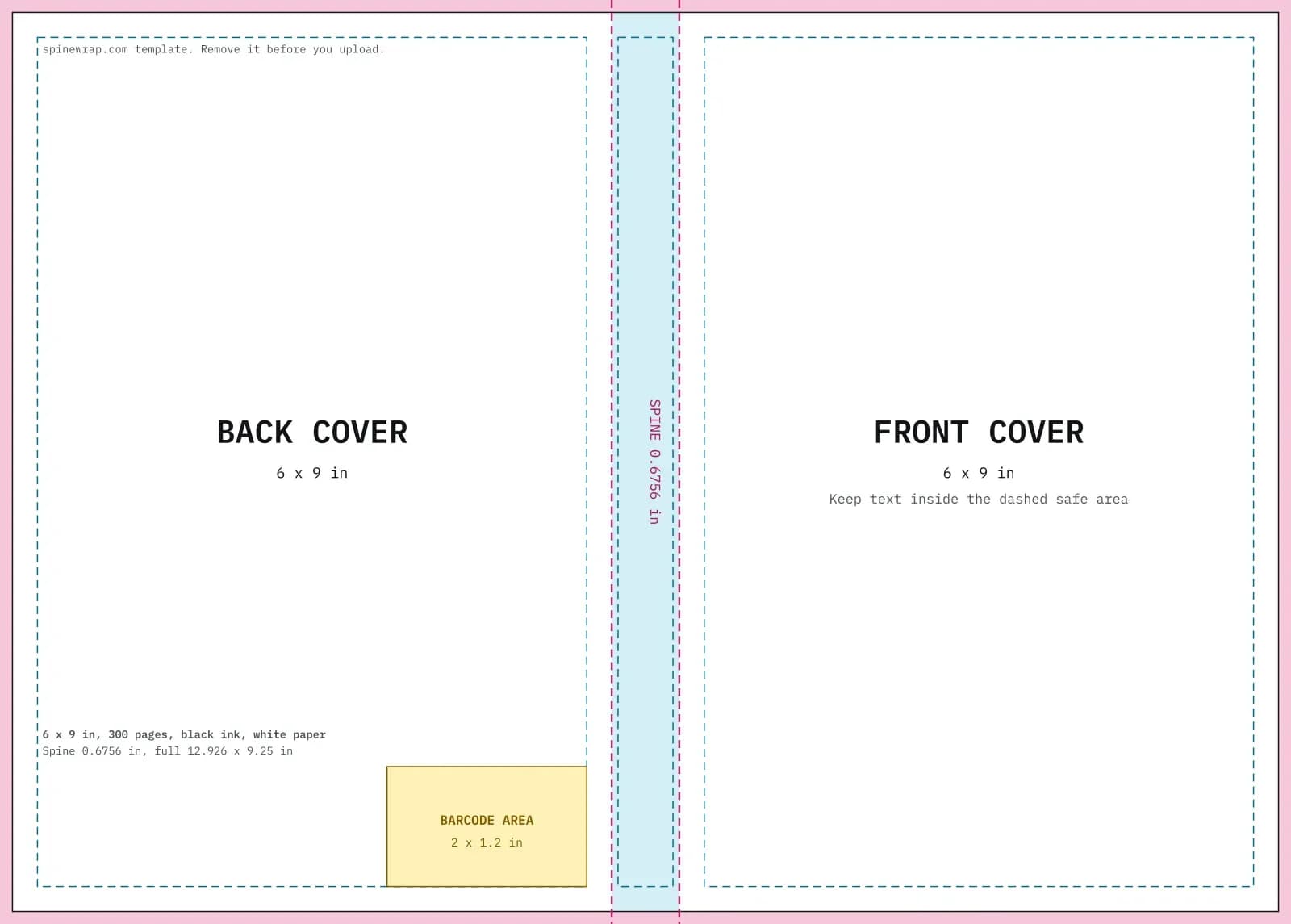
- Test input
- 6 x 9 in, 300 pages, black ink on white paper
- Output
- Cover template PDF and 300 DPI PNG
- Full cover
- 12.926 x 9.25 in
- Pixels
- 3878 x 2775 px
- Spine
- 0.6756 in
- Spine text
- Allowed
- PDF size
- 13 KB
- Build time
- 175 ms
How we check files: a script compares every size with the KDP formula, and we open each PDF to check fonts, margins and the spine. More on the about page.
KDP cover template FAQ
Is the KDP cover template free?
Yes. You can make templates for free every day, and they carry no watermark that touches your design area.
Can I use the template in Canva?
Yes. Create a custom design at the pixel size shown, upload the PNG and place it as the bottom layer. Hide it before you download your cover as a PDF.
Why does my template look different from the KDP one?
KDP builds its own template from the same formula, so the sizes match. Only the colors and labels differ.
Does the template include the barcode?
No. It marks the space only. If your file has no barcode, KDP adds one in that spot for you.